
01 / DISCOVER
⌕That song stuck in your head…↵
IndieHip-hopJazzYour next mood ↗
Go down a music rabbit hole.
Search songs, artists, and albums from YouTube Music’s catalog. Explore genres or paste a YouTube link to jump right in.
For the songs you love. And the ones you haven’t found yet. Meet your new favorite place to listen.

01 / YOUR NEW LISTENING SPACE
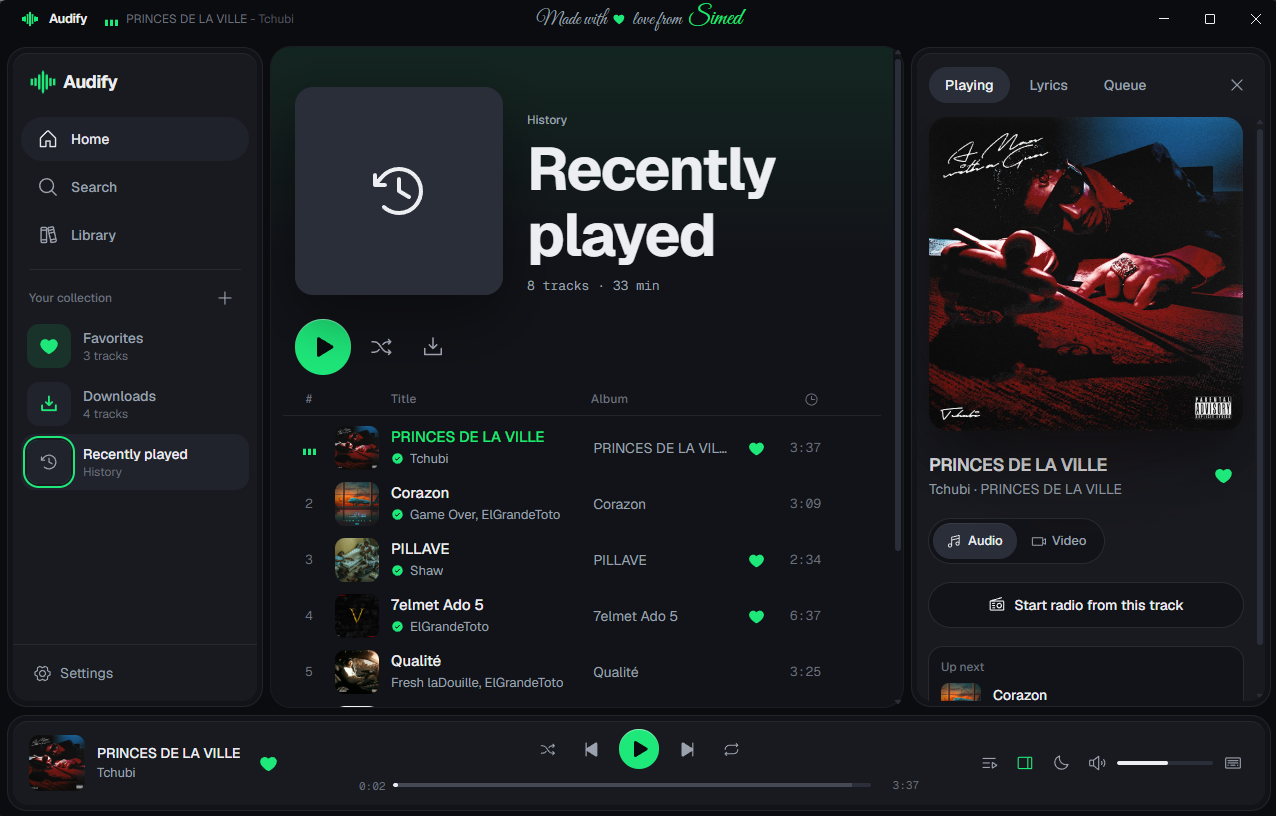
Your favorites, fresh discoveries, and that one song on repeat. All together in a player that feels like home.
02 / THE GOOD STUFF
Everything you need to get closer to your music, from the first search to the last encore.
Search songs, artists, and albums from YouTube Music’s catalog. Explore genres or paste a YouTube link to jump right in.
Save tracks, playlists, albums, or your favorites to your computer. Listen offline, with cover art and tags included.
Make playlists, save favorites, and revisit recently played tracks. Export your library and take it to another Audify.
Follow synced lyrics while you listen. Tap a line to jump to that moment, and keep available lyrics with your offline tracks.
Switch to music videos and settle into cinema mode.
Shuffle, repeat, queue it up, or start a radio from a track.
Light or dark. Your accent color. Your layout. Your vibe.
For the late nights.
The long drives.
The just one more songs.
03 / READY WHEN YOU ARE
Give your music a place of its own.
Pick your desktop and find your flow.
Your soundtrack, right on your PC.
Installer link coming soon
A new home for your music on macOS.
Installer link coming soon
Not sure which Mac you have? Open the Apple menu → About This Mac and look for Chip or Processor.
04 / A FEW GOOD ANSWERS
A little more about your new listening space.
Audify is a personal music player for your desktop. It searches YouTube Music’s catalog and brings songs, albums, music videos, playlists, and your offline library together in one app.
No account or subscription is required to use the player. Your playlists, favorites, and listening history are stored locally on your own computer.
Yes. Save tracks as MP3 or FLAC in your Downloads library while you’re online. Saved tracks then play from your computer without an internet connection. Searching and streaming new music still need internet access.
Choose Apple Silicon for a Mac with an M-series chip (M1 or newer). Choose Intel for a Mac with an Intel processor. Both require macOS 12 or later. You can check yours in Apple menu → About This Mac.
Yes. Use the export option in Settings to save a library backup. Import that file into Audify on your other computer to merge or replace your playlists, favorites, and history.
Choose Windows or your Mac processor above to download the matching Audify ZIP archive.
GO ON. FIND YOUR FLOW.